Showing posts with label Design for Web sessions. Show all posts

Friday, 11 November 2011

Web session 2 11/11/11

How to relocate files : (and make sure files are present in files panel)

Then 'edit' and relink the files


When editing the html code, its good practice to stagger divs and line up open and closes so you can tell which is which.
Insert 'content' div to html
create content css - and change colours so can see area in preview
If error message comes up in safari, then drag index file directly onto safari icon/open in safari and refresh.

Specify position otherwise it may not position elements where you intend them to be.
<<<<IF SOMETHING IS SOMETHING YOU NEED TO SPECIFY THAT>>>>

How to add content to website and arrange it

add this code to css to add buttons - work it out mathematically beforehand (you need to add the margins - in this case 80px each) - including a separate end button which will have an additional margin.
*if you specify 'margin' only then this will specify for a margin all the way around the button

Add to html IN BETWEEN NAV DIV:

WONT preview in safari - have to use design view in this instance


INTEGRATING IMAGES, MUSIC AND VIDEOS

Use marquess tool in photoshop to crop a certain sized area for thumbnail....

Change this to fixed size and then manually edit width and height in DESIGN tool bar across top....


save for web and devices

Code to insert image on css
html...

(drag image from files panel into html )

design view :


Lightbox for images
Shaddowbox for video - see simon for help.

Or google what you want + "javascript"

When buying webspace - choose unlimited bandwidth otherwise you could get charged.

You can add video code directly to HTML5 but it will use loads of bandwidth.

Use Vimeo to host your videos so that you don't use your own personal bandwidth.

Audio takes up a lot more space than images as well - use Soundcloud for this as it reduces how much bandwidth you will be using personally.

For domain names. 123reg.com.

For webspace, buy from One.com
DON'T get free web space as they will put ads on your site.
Cheap deals will be rubbish.

It has live help through a messenger style element.
It also offers FTP which means you can upload from dreamweaver rather than 
having to do it one file at a time.
One.com also has unlimited bandwidth and 
a free email address.


When you buy webspace, they will send you this information : 

FTP
Username
Password

Which you enter on Dreamweaver along with your domain name.
When you press 'TEST' it should work almost instantly. If it doesn't - It won't.
Troubleshoot :
At college you must do it through 'Port 21' (at home this doesn't matter)
At college it won't work through wifi - must use macs.
Add 'ftp.' as a prefix to your domain name.

HOW TO EDIT YOUR WEBSITE WHEN ITS LIVE

*The more updates you do on your website, the higher up the google rankings you will go. Additionally, the more your website gets clicked on on google the higher up you will go.

Updating your site - 99% of ways to do this involve software and cost money.

HOWEVER.....

Cushycms.com is free and is best for this as its online so you can update it anywhere in the world.
If you pay - you can have your own colours/branding on the site - good for web developers.
With cushy you can make your clients accounts and then they can edit their site via the areas that you have specified to be editable content.

This is the code to insert to make the 'content' area editable....

RATES
What to charge

Minimun £100 a page
e.g. 5 page site = around £800
Some people don't offer cms so you can factor that in and make you price slightly higher than someone who doesn't offer this (as they will be charging for each alteration the client wants to make).

MAKE SURE YOU SIGN A CONTRACT....
Make 3 'skamps' - sketches then once you have agreed on a 'skamp' of it, sign and then give them 10 Ammends, and if they go over that  then you can charge for  changes they want making.
Make them sign the actual design and add some legal stuff - see Simon.
If working with a client abroad, e-mail it, get them to print and sign it, and then send it back to you.
50% upfront - then other 50% before the website goes live.


*HOW TO MAKE A FAVICON

Find a Favicon generator website (free)
Make it in Photoshop - size dictated by Favicon generator - and then upload to get an ISO. file.


Friday, 21 October 2011

Web session 1

- Internet created 1990 by Tim Bernard Lee (Brit) and a Belgian dude
- They used to work for CERN (Hadron Collider)
- First ever server was a NeXT server - Created by Steve Jobs after being sacked from Apple - then earn't enough money to buy Apple.
- HTML (hyper text markup language)
- URL = Domain name
- WYSIWIG - what you see is what you get
- Dreamweaver can only accurately show you what your website will look like if it's html - css it struggles.
- Java script (plug ins) - hard to hand code - but you can steal and customise existing pieces of java script.
- It's okay to re-use other peoples java script
- CMS : content management system (like facebook - constantly updating)

Two kinds of website :
- Static website - less useful - nothing ever changes (e.g.ads)
- Dynamic website - interactive

Working with a client :
- sketch out design (scan) and site map
- draw up contract
- no more than 3 changes to the design (after the sketch has been agreed)
- After 3 they have to pay per hour
- make sure ALL pages link to one another
- get client to put together some inspirations (e.g.
- create swatches of the colour palette you are going to use (with hex codes) before you start
- choose fonts and font sizes before you start
- £500 for diy website - basic - took simon 6 hours - without working with a coder and creating something really complicated should really charge more than this. (£200-£700).
- Promotion - word of mouth only gets enough business.

- Most websites are 800px x 600px - follows 1990's guidelines.
- breaking these guidelines is more interesting...
- e.g. scroll left to right rather than up and down
- buttons tend to be square/rectangle (rather than shaped) because html responds to this. This is changeable in CSS.
- Need to make sure you website works accross multiple browsers - including iphone screen.


MAKING A WEBSITE IN DREAM WEAVER 

-Never use numbers/glyphs/spaces/caps/no more than 8 characters

create new html. site
to link to route folder  :  site>new site>
this should now show in the files panel

link server : when you buy website you will be sent the details to add to this page to make your site go live

 Home page must be saved as index. 
Html tables must add up - like a jigsaw - cells in a table must be specific size to fit into the table.

create a table :

good practice to add 0's rather than leave boxes blank
Some browsers read blank as 1

table so far...

have to edit height in code - space after width>select heigh and edit


&nbsp means 'nothing'


Change bg colour so can see shape in the live preview

star after file name means it hasnt been saved since changes have been made :

SAVE webpage then preview in safari.

10px gap between design and top of screen is impossible to remove in html - can in css

default alignment is left - changeable in code or design mode.


To create table inside table - click inside table and then insert>table again.


go to code - add height 

Merge cells


(add colour)

too bump up boxes and make it add up - click on bottom cell- add table then change height to 400px in code....


colour each section to make it easier to differentiate between them while working :

CSS WEBSITE

site>new site> link to new css route folder


html works by - separate pages of code
css - one page of code (style sheet)

create new html page and save, then create new css file and link to css route folder.
save as 'style sheet'
to link style sheet to html site - on html site go to icon and link to css site


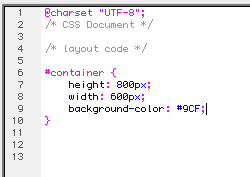
'notes' can be used to organise css - e.g. /* css document */ (in grey) = the note doesn't show on the site

Creating a 'div'

alt + 3  creates a # symbol

wrapper/container means table (equiv. in html)
curly bracket { brings up all the specifications possible.
using spaces and new lines keeps it tidy.


semi colon finishes it ;
add width and close with }

CODE IN HTML :

space it out to make it clear to read
add 'div' to code - as you type in div id=" it will bring up 'container)
add </ and it will bring up </div> to close
make sure close brackets!

too add colour to box on stylesheet after width> space> background colour 
(semi colon to close)

This should then change colour of box in html design view

(dimensions of box were wrong - switched round dimentions in css and saved ) =

to centralize box add 'position' to style sheet
chose 'absolute' 
this allows you to remove gap between table and top of page (absolute positioning)

KEEP SAVING TO PREVIEW IN HTML!!!!!!

safari preview:
to centralize :
Margin-left = minus half of full width

design view will probably no longer work - dreamweaver can't handle it

refresh browser if live safari view doesnt add up

add this to css
then edit in html code - insert div inside container div- use tab key to tab in new div to make it clear
new preview :